Show on Demand
You can show the loading screen on demand from any Blueprint that has a world context, without implementing any interface.
Call Create Loading Screen Process Task with a reason. The loading screen is shown until you call Unregister on the returned task.
Player Controller Example
- This example shows the loading screen for 4 seconds, called from the Player Controller Blueprint.

The plugin keeps the task alive until you call Unregister on it. If you never call Unregister, the loading screen stays up, unless you set a timeout as described below.
Making the task stop by itself
Expand the advanced pins on Create Loading Screen Process Task to make sure a task can't keep the loading screen up forever:
- Timeout Seconds: the task is unregistered after this many seconds.
0means no timeout, which is the default. - Unregister With Context Object: the task is unregistered when the object that created it is destroyed, for example an Actor that is removed during a level change. Off by default.
When a task expires, the plugin unregisters it and logs a warning with the reason of the task. Use Is Expired on the task to check it yourself.
Status text and progress
This example sets a timeout of 30 seconds, reports a status text and progress on the task, and unregisters it when the work is done.
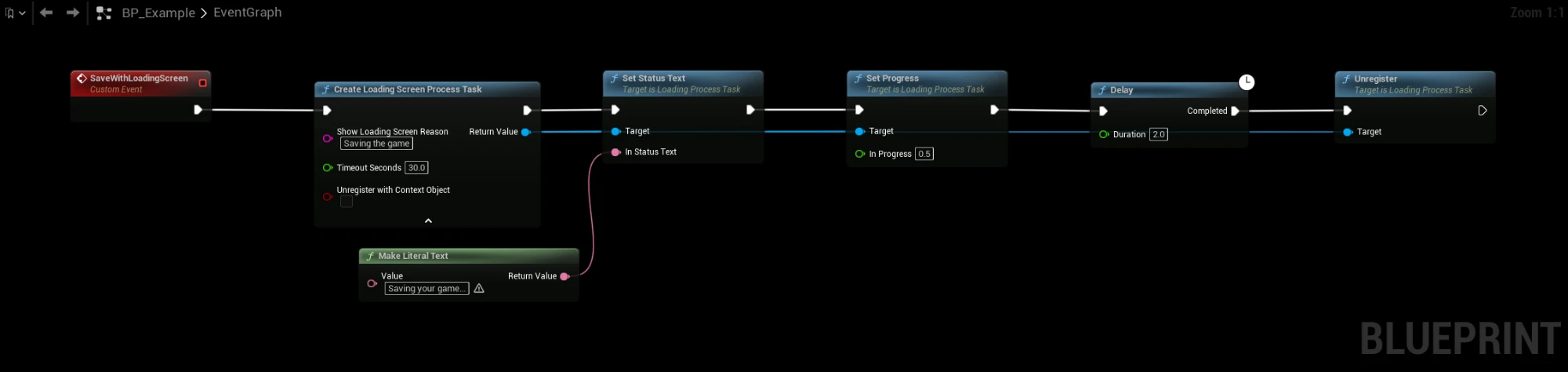
Updating Reason
- You can update the loading screen reason at any time with Set Show Loading Screen Reason on the task.

The Result

